Over the last several years, marketing teams working on developer content have focused heavily on traditional SEO, think keywords, backlinks, and meta descriptions. And for good reason: search engines like Google reward well-optimized pages. But today, a new kind of content discovery is gaining ground. Tools like ChatGPT don't rely on search rankings or crawl behavior in the same way. Instead, they pull information from content that is well-structured, clearly written, and easy to reference in a conversation.
For developer-focused teams, this presents both a challenge and an opportunity. If your documentation, tutorials, or blog posts are written in a way that large language models (LLMs) can easily understand, they have a better chance of being quoted when a developer asks a technical question. But if your content is vague, overly complex, or scattered across multiple layers of navigation, it might be skipped entirely even if it's well-researched.
This shift means marketers need to think a bit differently about how developer content is created and shared. Instead of writing only for search engines or human readers, it's now just as important to structure content in ways that AI can digest. Think of it like setting your content up to be "quoted" instead of just "found." When developers trust the answer ChatGPT gives them, and that answer comes from your blog or docs, you've just won a moment of meaningful visibility.

Have you ever searched your blog or docs in ChatGPT? What came up, if anything?
Why LLMs "Prefer" Some Content Over Others
When someone asks ChatGPT a technical question-like "How do I fix a 403 error when deploying to AWS?" the model pulls from sources it's learned from, or sometimes from what it can access in real time. But unlike a human reader, ChatGPT isn't skimming through design or layout. It processes the raw text and code. What it's looking for is content that's clear, structured, and easy to reuse.
That's why developer content that uses straightforward language, full code examples, and consistent formatting has a much higher chance of being referenced by AI tools. In other words, content that's built to explain, not just describe, stands out.
Here's an example: Imagine your team writes a thoughtful blog post on Kubernetes YAML errors. It's informal, includes a few screenshots, and tells the story of a tricky bug you resolved. That might resonate with developers who read the full piece. But to a tool like ChatGPT, a different post might win out-one that includes exact error messages, terminal outputs, and well-annotated YAML, all in a clear structure. That's the version most likely to be quoted when a developer asks for help.
The key takeaway? Developer content that's explicit, complete, and easy to follow isn't just helpful to readers, it's also more likely to be surfaced and trusted by AI models. And that makes it even more valuable.
Tip: Include sample inputs and outputs for commands or code you mention. The more complete the example, the more useful it becomes.
Example:
Weak: "It throws an error during deployment."
Strong: "Running kubectl apply -f deployment YAMLl returns the error no matches for kind Deployment because v1beta1 is deprecated in Kubernetes 1.22."
Does your technical content include complete error messages, or do you assume the reader knows them already?
What Makes Content "LLM-Ready"?
One of the most effective ways to make your developer content more useful to AI tools like ChatGPT is to think of it as a reference guide, not just a narrative. That doesn't mean it has to sound robotic, but it should be easy to scan, with a clear structure and purpose. Developers (and language models) look for content that's quick to digest and full of direct answers.
Start by avoiding shortcuts or vague language. Phrases like "you know the drill" or "just add the variable" can leave both humans and machines guessing. Instead, be specific. Mention the exact command, explain what it does, and why it matters. These small edits can make the difference between content that's skimmed over and content that's genuinely helpful.
Format matters, too. Tools like ChatGPT rely on structure to make sense of what they're reading. Simple formatting tools like headings, bullet points, and clearly labeled code blocks go a long way. If you're using Markdown or HTML, make sure it's clean and consistent. Think of it like organizing a workshop: the better your labels, instructions, and tools are laid out, the easier it is for someone whether a developer or an AI model-to get the job done.
Checklist for LLM-readiness:
- Use ### Headings for every major section.
- Include complete, copy-paste-ready code blocks.
- Explain every input, output, and config option.
- Avoid unexplained acronyms-spell them out on first use.
Example:
# Install Flask using pip
pip install flask
If ChatGPT quoted a random line from your tutorial, would it make sense on its own? Try reading just one section out of context. Does it still work?
Introducing /llms.txt: Your Site's Handshake with AI
A helpful new tool for making your content more visible to AI models like ChatGPT is something called /llms.txt. It's based on the familiar concept of robots.txt, which tells search engines how to interact with your site. Similarly, /llms.txt gives you a simple, transparent way to guide how large language models (LLMs) access and use your content.
Placed at the root of your website like https://yourdomain.com/llms.txt, this file includes basic instructions: what content should be included or excluded, where key resources like your sitemap or GitHub repo live, and whether you'd like attribution when your content is referenced. It's easy to create, easy to read, and designed to make your intentions clear to AI systems.
Think of it like a welcome mat for AI: you're showing language models where the most helpful content lives, and on what terms. For example, if you publish a developer blog about performance testing in Rust, a clear /llms.txt file can guide AI systems to your tutorials and ask that you be credited when quoted. It's a small step that helps ensure your content isn't just found, but respected and used the way you intended.
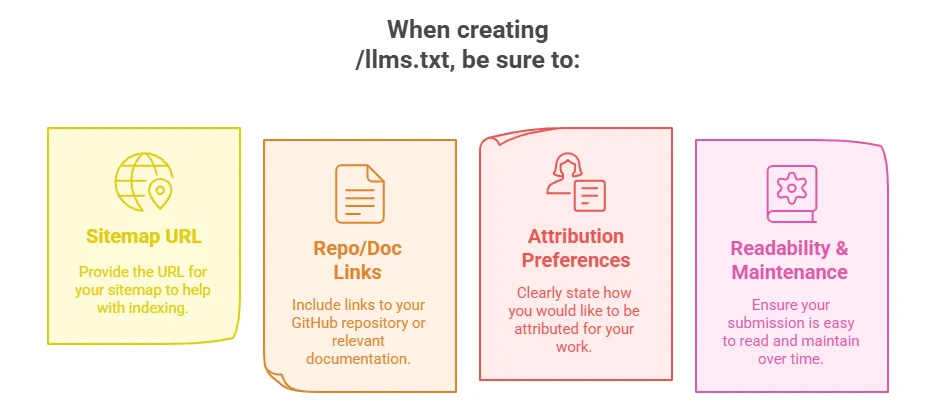
Example file content:
llm: gpt-4
allow: /
sitemap: https://myblog.dev/sitemap.xml
github: https://github.com/myorg/docs
attribution: required
Does your site already have a /llms.txt file? If not, what would you include in it today?
Building a Great /llms.txt File
Creating a /llms.txt file is simple. You don't need special software, just a plain text editor and a few lines of clear instructions. If you're not sure where to start, there are online generators that make the setup process even easier.
What matters most is clarity. In the file, you can specify which types of AI models are welcome to use your content, where to find your sitemap, whether you'd like attribution, and links to relevant resources like your documentation or GitHub repo. Think of it as a signpost for AI systems helping them understand not only what's on your site, but how you'd like it to be used.
It takes about ten minutes to set up, but the impact is meaningful. Adding a /llms.txt file shows that you're not just publishing content you're making it accessible and accountable in an AI-driven world. It's a small, proactive way to ensure your work is discoverable, usable, and credited when developers encounter it through tools like ChatGPT.
Example use cases:
- Want AI to ignore your internal changelogs? Just disallow those paths.
- Want your blog featured more often? Link your RSS feed or dev.to your profile.
Would you prefer LLMs to credit your work, or use it anonymously? Why?
Real-World Example: AI-Friendly Developer Content in Action

Let's say your team is writing a blog post about adding OpenTelemetry tracing to a Python Flask app. There are two ways to approach it. The first version is short; it says, "Install OpenTelemetry and configure your app," and links out to the documentation. The second version takes a different approach: it walks the reader through each step, includes error messages they might encounter, shows what the configuration looked like before and after, and even explains what the trace data will look like once it's working.
Which version is more likely to be picked up by ChatGPT or another AI assistant? The second one because it stands on its own. It gives the full context, anticipates the reader's questions, and can be used as a complete answer without needing to leave the page.
This is the kind of content developers value, too. It saves time, solves a specific problem, and builds trust. A helpful tip: titles that start with "How to…" tend to perform well with both developers and language models because they signal clear, instructional intent right away.
Before vs After Example:
Before: "Just add the tracer config."
After:
from opentelemetry.instrumentation.flask import FlaskInstrumentor
FlaskInstrumentor().instrument_app(app)
This enables auto-tracing of your Flask routes using OpenTelemetry.
Have you ever rewritten an old tutorial to make it more referenceable by AI tools? If not, which one would you update first?
The Future of SEO is AI Visibility
The way people find technical answers is changing. More and more, developers are turning to tools like ChatGPT instead of traditional search engines. That shift raises a new question for content teams: Is your work being cited and used by AI, or is it being overlooked?
This doesn't mean SEO is irrelevant but it does mean there's now another layer to consider. To help AI tools understand and surface your content, you need to structure it in a way they can easily process and reuse.
That starts with a few practical steps: using clear formatting, sharing full examples that stand on their own, and adding a simple /llms.txt file to guide how AI interacts with your site. These are not complex technical tasks. Think of them as the modern equivalent of making your content easy to find, read, and quote, whether the reader is a human developer or an AI assistant.
Emerging best practices for AI visibility:
- Maintain consistent tone and format across all docs.
- Tag posts with language and framework names (e.g. "Python," "Next.js").
- Ensure your author bio includes developer credentials or expertise.
Example:
Rename "Tips & Tricks" to "How to Set Up Rate Limiting in Express.js" for clarity.
Are your blog titles phrased like answers to real questions, or just clever puns? Which one would ChatGPT prefer?
Wrapping Up: Your Next Move
If you're wondering where to start, begin with the developer content you already have-things like tutorials, FAQs, integration guides, or case studies. Review them with fresh eyes, imagining how an AI tool like ChatGPT would interpret them. Are they clear and well-structured? Do they include examples that make sense without extra context? Could someone new to the topic understand them without needing to click away?
Once you've identified content that could be improved or clarified, take a small but meaningful next step: create a /llms.txt file for your site. Think of it as a digital handshake, your way of signaling to AI systems that your content is ready to be discovered and used appropriately.
The goal isn't just to publish content, but to make it accessible in the ways developers are increasingly searching for answers. And if done well, the next time someone asks ChatGPT how to debug a Redis timeout or deploy a serverless app, it might be your team's content that provides the answer.
Let your content do what great developer content does best: solve problems, helpfully, and without friction, for both humans and machines. ng how-to-rank-higher-on-chatgpt-for-developer-content.md…]()
 Enlear