Why Developer Marketing Needs a Different AI Strategy
Using AI Without Sacrificing Trust
If you've ever written content for developers, you already know, it's not like writing for anyone else.
You're not just telling a story. You're showing your work. Whether it's an SDK guide, an API documentation, or a performance benchmark, developers expect more: technical accuracy, real-world relevance, and zero fluff. And if something's off? They'll spot it instantly.
That's why developer content is held to a higher standard, not just by readers, but by search engines too.
Now enter AI. It's tempting, right? It can speed up structure, spark ideas, and even help with drafts. But here's the thing: unfiltered AI output can be risky. A single inaccuracy in a code snippet or a vague explanation can tank trust, and your SEO along with it.
So how do you use AI without cutting corners?
Simple: treat it like a smart assistant, not a ghostwriter. And follow the rules. Both Google and Bing have laid out how AI-generated content should be handled, and yes, they're watching.
Here's how to do it right.
Google's Position: Quality Over Origin
Google has clarified its position in its official Search Central blog post:
Using automation, including AI, to generate content with the primary purpose of manipulating ranking in search results is a violation of our spam policies.
What's Allowed
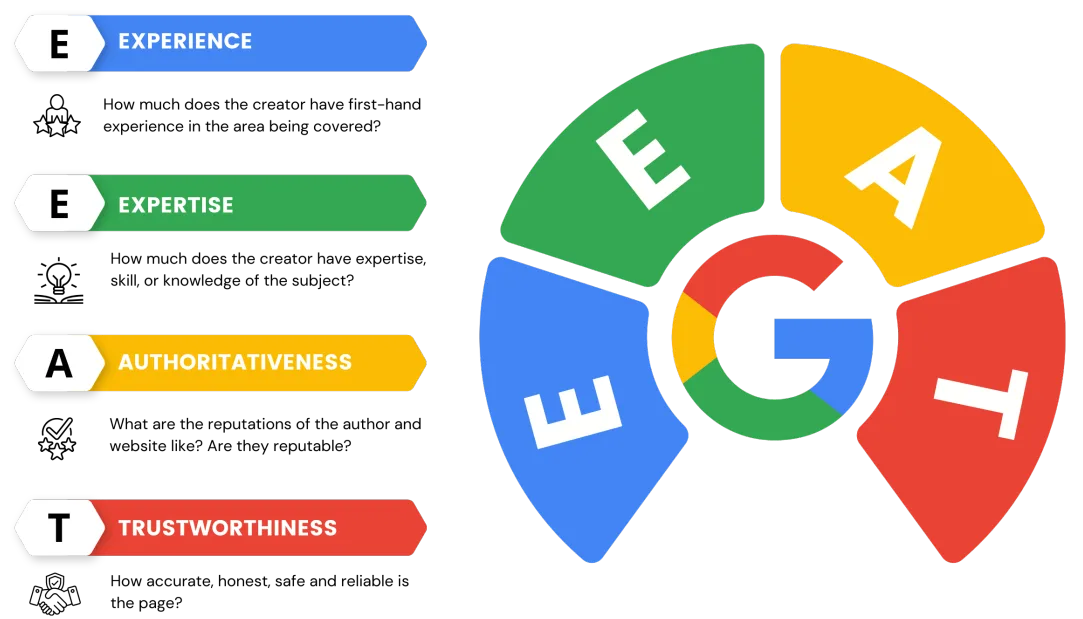
AI-generated content is fine if it's original, helpful, and written for people, not search engines. The E-E-A-T Model is how Google evaluates whether your content delivers on that promise.
Why does this matter for developer content?
Because developers aren't casual readers, they're problem solvers. They need technically sound content, based on real experience, and backed by credible sources.
Here's how each part applies:
Has the person writing the content actually used the technology they're talking about? A walkthrough of a Redis setup should reflect hands-on insight-not just a summary from another blog.
Is the content created by someone who knows what they're doing? Developer audiences can smell surface-level knowledge from a mile away. Google knows that, too.
Are you or the brand recognized as a reliable source? This can be built through consistent publishing, contributor bios, links from respected domains, or featuring known SMEs.
Is the information accurate, up to date, and verifiable? Are the code examples tested? Do you link back to official documentation? Is the tone honest and not overhyped?
How does this tie into AI-generated content
If you're using AI to assist your workflow, great, but you still need to review and enrich the output to meet E-E-A-T standards. AI can't fake real experience, test code, or cite sources unless you guide it.
Bottom line? AI can help, but E-E-A-T is what earns your ranking and your readers, trust.
 What to Avoid
- Spinning code explanations without validation.
- Writing tutorials that are vague or inaccurate.
- Using AI to mass-produce keyword-stuffed, low-value articles.
Bing's Approach: Responsible and Grounded Content
With GPT-4 now powering Bing's generative AI, Microsoft has made one thing crystal clear: content must be trustworthy, accurate, and grounded in real sources. This isn't just a best practice-it's baked into their Responsible AI strategy.
In AI-assisted search and chat, speed is important, but reliability is non-negotiable. Especially when developers are asking technical questions, they're not looking for creative guesses; they're looking for verified, usable answers.
Microsoft's Responsible AI guidelines spell it out: output should be transparent, backed by credible data, and clearly traceable to a reliable origin. If it can't be verified, it doesn't belong in production content.
Read: Responsible AI for the New Bing (April 2023)
Highlights:
- Bing uses classifiers and filters to detect harmful or low-quality AI outputs.
- Emphasizes grounding responses in high-ranking, credible search results.
- Encourages transparency: clearly informs users when content is AI-generated.
We provide references to source websites so that users can verify the response and learn more.
Safe AI Use for Developer Marketing Content
What Is Safe AI Use?
In developer content, "safe" AI use means using automation to assist, not replace, human judgment, technical validation, and real-world experience. The goal isn't to fully automate content, but to streamline your workflow while preserving trust, accuracy, and credibility.
AI can be a powerful tool, but only when paired with the right guardrails.
Do's
- Use AI for scaffolding complex content, outlines, code snippet formatting, and glossary entries.
- Have human experts validate AI-written technical explanations.
- Summarize long technical papers or changelogs using AI, then polish for clarity.
- For SEO, include real data, backlinks to documentation, and working code examples.
Don'ts
- Don't blindly trust AI-generated code; always test and lint it.
- Avoid "hallucinated features" (functions that don't exist).
- Don't use AI to generate fake benchmarks or claims about performance/security.
- Never publish AI-generated legal or compliance content without review.
Developer Content: AI Prompts and Workflow Tips
When used right, AI prompts can jumpstart your content creation process without losing technical depth. The key is to be specific: a clear role, a clear audience, and a clear purpose.
Effective prompts can help you:
- Speed up outlines and first drafts
- Translate complex topics into digestible formats
- Tailor content to different technical levels and roles
- Repurpose documentation into tutorials, summaries, or comparisons
Here are a few examples of what you can generate with focused, well-structured prompts:
- "Draft a beginner tutorial for using Redis with Node.js."
- "Compare REST vs GraphQL APIs for a CTO-level audience."
- "Summarize the new AWS Lambda pricing update for a newsletter."
Each of these prompts gives AI a clear role and purpose, accelerating your workflow while keeping the human layer in charge of editing, validating, and publishing.
Workflow Suggestion:
- Use AI to generate an outline.
- Fill in trusted code examples from GitHub or internal repos.
- Insert citations from official docs (e.g., docs.microsoft.com, developer.mozilla.org).
- Review for voice, brand tone, accuracy, and SEO optimization.
Final Thoughts: AI Is Your Assistant, Not Your Author
In developer marketing, authenticity and technical truth always win. It's not about how much you publish, it's about how real, accurate, and useful it is.
AI can help you move faster. It can speed up outlines, summarize docs, and even help frame a rough draft. But it can't replace a developer's voice or their credibility.
The smartest approach? AI-first draft, human-final publish.
Let the tools do the heavy lifting, but keep the insights grounded and the code tested. That's how you build content developers' trust-and that's what makes it stick.

 Enlear