Most technical blogs don't fail because the writer lacks knowledge. They fail because the reader gets lost. A confusing example in the first paragraph, one undefined term, a section that wanders off, and the tab is closed. At Enlear, we write and review content for developer tool and SaaS companies every day. The same few fixes turn a hard-to-read draft into something developers finish, share, and act on. This guide collects those fixes into eight rules and a checklist you can use before you hit publish.
1. Know your reader and your one message
Before you write a word, answer two questions:
-
Who is this for? A backend developer, a founder and a marketing lead need very different articles, even on the same topic.
-
What's the one thing they should take away? If you can't say it in a sentence, the article isn't ready to write.
Every section should push that one message forward. If a paragraph doesn't, cut it or save it for another post.
Make the title easy to read. Say it out loud. If you stumble, your reader will too. A title like "Feeding coding agents production truth" sounds clever but makes people work. "Why AI coding agents need production data" tells them exactly what they'll get.
2. Use simple, realistic examples
Your opening example is the foundation of the whole article. If readers get confused there, they won't recover.
-
Make the reader's role clear. Start with "Suppose you're a developer building…" so they know whose shoes they're in.
-
Use things people already know. "A shopping cart" lands instantly. "A B2B storefront checkout service that prices every cart" needs a second read.
-
Skip the drama. Timelines like "20 minutes later…" and "by mid-morning, the on-call engineer…" turn a teaching example into a thriller. Keep it factual.
-
Stick with one example. Carry it through the article instead of switching to a new one in every section.
-
Label made-up numbers. If the figures are illustrative, say so. Never present an invented example as a real incident.
Before
You own checkout for a B2B storefront, a Node service that prices every cart before payment. 20 minutes later, there's a pull request: the diff is tidy, the types line up, CI goes green.
After
Suppose you're a developer adding a loyalty discount to a shopping cart. Your coding agent writes the feature. Type checks pass, tests pass, and CI says it's good to go. But after release, checkout starts timing out.
3. Use plain, consistent language
Technical readers don't mind technical words. They mind words that make them stop and guess.
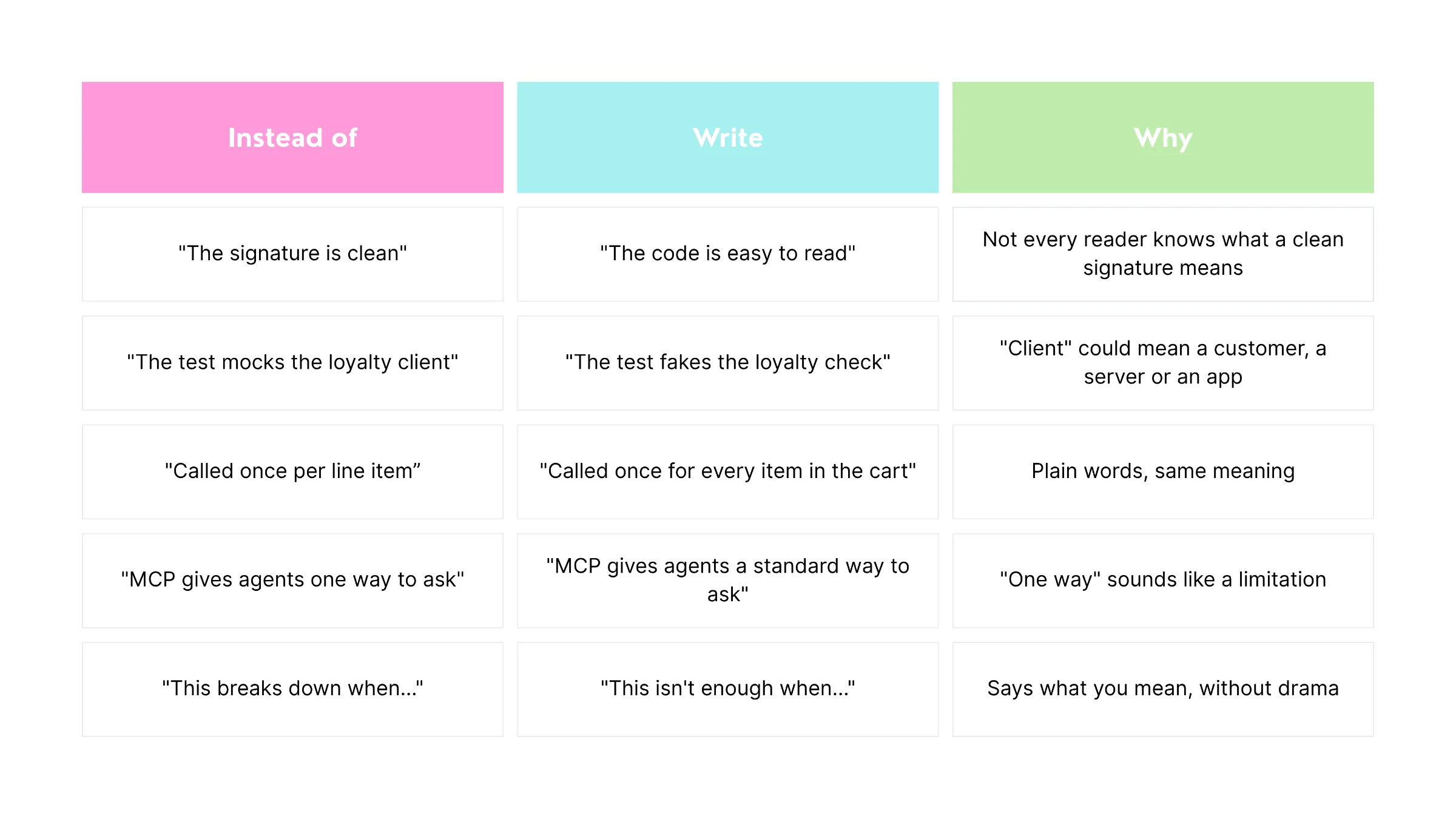 Says what you mean, without drama.
Three habits that help:
-
One term per thing. If you call it a "customer" in paragraph two, don't call it a "client" in paragraph five.
-
Define a term the first time. "Production (the live system your users depend on)" costs a few words and saves a lot of confusion.
-
Short sentences. One idea per sentence. If you need a breath halfway through, split it.
4. Explain the why, not just the what
An example shows what happened. Your job is to show why it matters beyond that one case.
-
Zoom out from the example. If your example is a timeout, make clear it's one symptom of a bigger issue, not the whole story.
-
Answer the obvious objection. Readers are already thinking "we have monitoring for that" or "our tests would catch it." Raise it yourself and answer it honestly.
-
Add a reality check. Point to how people actually work. For example, reviewers tend to skim code that looks polished, even when it hides a risk.
When you explain the why, readers stop seeing your article as a single anecdote and start applying it to their own work.
5. Back up every claim
Developers check sources. One shaky number can undo the credibility of an entire article.
-
Link to the original. Point to the official docs, the study or the standard itself, not a blog that summarized it.
-
Use established frameworks where they fit. If you're talking about delivery speed or failure rates, the DORA metrics give readers a shared language they already trust.
-
Don't stretch the evidence. If a study covered three tools, don't write as if it covered the whole market.
-
Separate facts from opinions. "The survey found…" and "We think…" are both fine. Mixing them up is not.
6. Structure it for scanning
Most readers scan first and decide whether to read second. Give them a page that rewards scanning.
-
Lead with the point. Put the main idea in the first two sentences, then add the detail.
-
Use headings that say something. "Why this keeps happening" beats "Background." A reader should get the gist from the headings alone.
-
Keep paragraphs short. Three sentences is plenty.
-
Pick the right format. Comparisons go in tables. Steps go in numbered lists. Processes and flows go in diagrams.
-
End with something to do. A checklist, a 30/60/90-day plan or three clear next steps.
7. Tie it to the reader's business
A technically correct article can still miss if the reader can't see what it means for them.
For a developer tool company, ask:
-
What does this change for our users? Faster setup, fewer failures, less time debugging.
-
What does it change for our product? A new feature to build, a gap to close, a story to tell.
-
What should the reader do next? Try a tool, read the docs, book a call.
Then close with a call to action that fits the article. A guide about better docs should point to help with docs, not a generic "contact us."
8. Sound like a person, not a template
Developers can spot filler from the first line. It makes even accurate content feel untrustworthy.
-
Cut warm-up sentences. "In today's fast-paced digital world" adds nothing. Start with the point.
-
Drop buzzwords. Words like "seamless," "robust" and "game-changing" tell the reader nothing specific.
-
Write like you'd explain it to a colleague. Use "you" and "we." Use everyday words.
-
Read it out loud. Anything that sounds stiff or that you'd never say in a conversation, rewrite.
-
Check before you publish. Run your plagiarism and AI-detection checks, then fix anything flagged by rewriting it in your own words.
Before you publish: the checklist
-
I can state the article's one message in a single sentence
-
The title is easy to read out loud
-
The opening example makes the reader's role clear
-
I use the same example from start to finish
-
Illustrative numbers are labeled as illustrative
-
Every technical term is either common or defined the first time
-
Each thing has one name, used consistently
-
I show why the example matters beyond itself
-
I answer the most obvious objection
-
Every fact links to an original source
-
Headings tell the story on their own
-
Paragraphs are three sentences or fewer
-
The article ends with clear next steps and a relevant call to action
-
I read it out loud and fixed anything stiff
-
Plagiarism and AI checks are done
-
Someone outside the topic can follow the first section
Conclusion
Good technical writing isn't about sounding smart. It's about making the reader's job easy: a clear point, a simple example, consistent words, honest evidence and a page they can scan. Get those right, and your expertise finally reaches the people it's meant for.
Need technical content that developers actually read? Enlear writes and reviews blogs, docs and launch content for developer tool and SaaS companies. Talk to us.
